Last month I helped my in-laws move. They were downsizing and I volunteered to consolidate their computer collection for them. Technically, they are my ex-in-laws, but we remain family and have known each other for a very long time. Just how long – and how long I have been helping them with PC issues and advice – became clear to me when I took a survey of their equipment. As far as I could tell they hadn’t disposed of any computers or peripherals in more than two decades. I found myself working through an inventory of nearly a dozen PCs, many of them old friends I hadn’t seen in years; like the Gateway 2000 desktop PC loaded with Reader Rabbit and Freddi Fish for one of their grandchildren, now just starting college. I retired most of these machines: backing up the data, eliminating redundancies and wiping the hard drives to assure that no personal data remained.
My most exciting find was the Lenovo ThinkPad 750c laptop I had used while living in Switzerland in the early 1990’s (the “c” in the name stands for color, most laptops at this time were monochrome). It was my first Windows laptop – indeed the first Windows machine of any kind that I had purchased with my own money. Before that I had only owned Apple Macintosh computers for personal use, using IBM Windows-based PCs at work (Credit Suisse bank at the time). After that, I was a Windows convert and with my move back to the US I moved on to newer, faster notebook PCs , giving the ThinkPad to my father-in-law.
In a cool coincidence, the ThinkPad notebook PC celebrated a milestone birthday today. The first ThinkPad, the model 700c, was introduced 20 years ago at the 1992 Comdex tradeshow in Las Vegas. (See ThinkPad turns 20: How IBM’s ‘Black Box’ Defined the Laptop Industry and the anniversary event at the MoMA that inspired several other recent write-ups.) MyThinkPad 750c was a couple of models later/newer than the venerable 700c. I discovered it in my in-laws’ garage inside a laptop bag marked with a “1995 WinHEC” logo from Microsoft’s Windows Hardware Engineering Conference at San Francisco’s Moscone Center – I had just begun working at Microsoft at the time. Inside the bag was the ThinkPad, its power supply, a 10-key attachment, the original User’s Guide and utility disks (on 1.44MB/3.5 inch diskettes). There was also a protein bar which appeared to be well preserved, though I elected to toss it rather than risk a taste. I purchased my ThinkPad 750C in 1993 for $4,300 (adjusted for inflation that would be about $1.5 million in today’s dollars, I’m guessing). It weighs in at 7.6 lbs (about 3 kg), has a 120 MBG hard disk, 8 MB RAM and a 10.4 display. Except for those specs and an obvious thickness, it looks very much like a modern laptop.
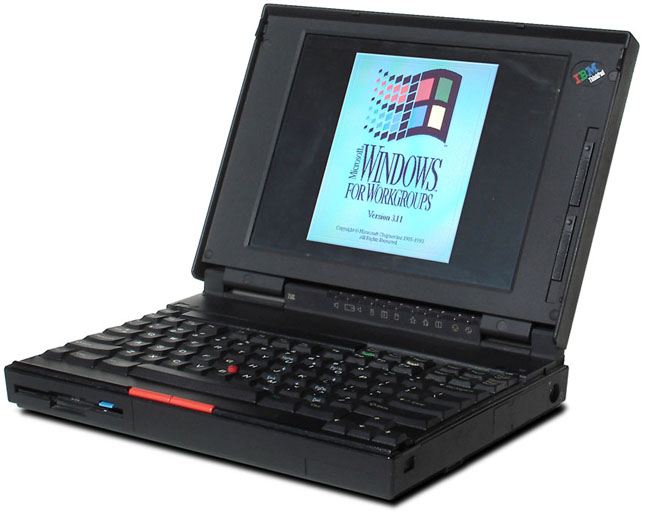
Happy 20th Birthday ThinkPad!
- My ThinkPad-750c
Moore’s Law, and heavy daily usage, make it painful for me to keep a computer for more than a few years. As a result, I’ve gone through dozens of PCs and laptops in my life – and a handful of Macs. With the introduction of Windows 8 later this month, I expect I’ll soon be moving on once again. Rather than watch them pile up in a closet (or, like my in-laws, the garage) I sell them or give them away to someone who doesn’t care about cutting edge technology. But this particular laptop has found its way back to me. Although it has no practical value, it does have enough sentimental value to earn a place on my bookshelf next to my father’s Polaroid Land camera (circa 1969, the collapsible one with the bellows – and no, you didn’t have to shake the picture). But before shelving the 750c, I had to first see if it would start. After 10 or more years in a bag and nearly 20 years since it was manufactured, I plugged it in and crossed my fingers. Only a faint, rapid clicking sound emitted from the “black box”. I sat and thought a bit. The system clock battery as well as the main laptop battery must have died years ago. I tried again, this time holding down the F1 key to skip the battery and system tests. Success! The relic sprang to life. The BIOS ran and Windows 3.11 began to load. Welcome to 1993! Now I can celebrate the ThinkPad’s birthday in style.
Fun side note – The ThinkPad was the only laptop certified for use on the International Space Station and the ThinkPad 750c was the first laptop in space as it road along on the Shuttle Endeavour’s flight to repair the Hubble Space Telescope on December 2, 1993. Three ThinkPad 750c notebooks remained on the Mir space station when it burned up in the atmosphere in a controlled crash into the Pacific Ocean on March 23, 2001. Mine sits on a shelf in the living room.
President Obama and Governor Romney faced each other tonight in the first of three presidential debates. While everyone was watching the candidates, my communications colleagues and I were watching to see how well their PR teams had prepared them for this moment. Back in February I wrote about Romney’s performance in a CNN hosted debate amongst the Republican challengers for the nomination. In that post I faulted Romney for not following one of the most basic tenants of media training when asked a question: Acknowledge, Bridge, Control. This time around Romney minded his ABCs while the President made some remarkable rookie mistakes of his own.
Governor Romney was articulate and on-message and showed passion in delivering his message. He had clearly rehearsed his talking points to the point where they didn’t sound rehearsed at all. While he didn’t necessarily answer some of the questions directly, there were no jarring segues as he maneuvered to get to his point. In substance, the two candidates may have battled to a draw, but in style, Romney was the clear winner. He presented his points with enthusiasm and energy without coming across like a bully. Some might say that he sounded almost presidential.

Body language tells the story of the first Presidential debate in this CBS split screen.
Just as Romney forgot his ABC’s back in February, Obama appears to have forgotten the basic lessons of delivering one’s message with confidence and passion. Body language is an important part of presenting, as it subliminally contributes so much to how we evaluate people. This is the lesson we can take from tonight’s debate and use in our everyday lives. Passion and energy in your presentation can often win out over substance. Ideally you should be prepared to deliver both.

I woke up this morning to the sound of thunder. Not actual thunder, but rather an article in my morning paper about the Windows 8 release to manufacturing (RTM). This news means that the major work has been completed on the next version of Microsoft Windows, the operating system (OS) ubiquitous to desktop computers around the world. This, on its own, is not big news. It will be months before readers will be able to purchase Windows 8 on a new PC or in a shrink-wrapped box at Best Buy or Costco (October 26, 2012 – to be exact). But it is the rumble of an approaching storm – and part of a classic marketing communications technique descriptively referred to as Rolling Thunder.
A rolling thunder public relations campaign is designed to build in strength and ferocity like a storm growing in the distance. You hear it coming from a long way off with a rumble of announcements here and a rumble of mentions there. The thunder grows louder as the real news storm approaches. The idea is to spread out your announcements over time so that instead of getting one single POP! at the product launch, you can enjoy several news stories along the way while building anticipation for the day when your customers can take action.
Microsoft began brewing this storm a long time ago. It first came onto my radar with the Windows 8 Consumer Preview in February of this year. Here’s a quick look at just some of the Windows 8 related announcements Microsoft has made over the past 6 months:
- February 17 – new Windows 8 logo
- February 29 – Windows 8 Consumer Preview
- May 31 – Windows 8 Release Preview
- June 4 – Windows 8 mentions in virtually all of Microsoft’s E3 news (Electronic Entertainment Expo)
- June 18 – Microsoft Surface family of PCs announced, “Built for Windows 8!”
- June 20 – Windows Phone 8 announced, many Windows 8 mentions
- July 9 – Windows 8 mentions in virtually all the announcements made at Microsoft’s Worldwide Partners Conference
- July 16 Office preview announced, “Office at Its Best on Windows 8”
Your company may not have Microsoft’s resources or its depth and breadth of products, but that doesn’t mean you can’t utilize a similar Rolling Thunder communications campaign. Start by thinking long term. Your PR calendar should be planned out at least one year in advance. Look for synergies with other products or services within your company – and outside your company if there are mutual benefits for partners. You may find the tie-ins in unexpected places, such as earnings announcements or otherwise routine company statements. (e.g.- Moving to new offices? Make sure to mention that it’s in preparation for your upcoming product launch.) Set the context for your big news, keep your name out there, and build anticipation. In short, do your best to control the weather.

The 10th Anniversary cover for “On Writing”
Marketing communications professionals write and read for a living. Not novels of course, (unless they’re doing it on the side) but anyone working in advertising, branding, promotion, publicity, or public relations is a heavy reader and writer. That’s one of the things I like about my job.
Stephen King writes a lot – mostly suspense, horror and fantasy fiction, many of which have been adapted into feature films and television movies. Although he has written more than 50 books which have sold more than 350 million copies combined, you won’t find many (or any) of these on the ubiquitous “Must-Read” book lists. His great success as a writer of so much popular fiction condemns him as a hack by many serious literary critics. I’ll admit to having shared some of that prejudice, until a friend pointed me to his book, On Writing, A Memoir of the Craft.
Originally published in 2000, On Writing was updated on its 10th anniversary. It is intended to offer advice for writing fiction novels, but certainly it can be generalized to any sort of writing. Here’s a sampling of King’s insights that would benefit just about any marcomm professional on any given day:
- Read a lot and write a lot. If you cannot find the time for that, you can’t expect to become a good writer. King writes four to six hours a day and reads about 50 books a year, some of these as audio books. (On Writing makes a good audiobook candidate.)
- Writing is about the story, it’s not character study, it’s not about the theme/message. Begin and end with the story.
- Writing is telepathy – the author relays his/her thoughts into the reader’s mind.
- The old cliché, “write what you know” is an impossibly boring restriction. Rather, write the truth. This means being honest, getting to the heart of the matter. Don’t bullshit your reader.
- Kill your darlings! You might take this the wrong way when it’s Stephen King repeating this advice. Often attributed to William Faulkner, the original phrase was ‘murder your darlings’, from Sir Arthur Quiller-Couch: “Whenever you feel an impulse to perpetrate a piece of exceptionally fine writing, obey it – whole-heartedly – and delete it before sending your manuscripts to press. Murder your darlings”.
- While you’re at it, kill your adverbs (“The road to hell is paved with adverbs”). King can be a good sport about some adverbs, except in the case of dialogue attribution (he said, menacingly).
- 2nd draft = 1st draft – 10% (many of your darlings live in that 10%)
- The toolbox matters: Know your vocabulary. Know your grammar. The way you learn is by reading and writing, a lot.
- First writing is for yourself (door shut, literally). The re-writing is for your reader (edit with your door open, literally).
On Writing shows its age (gasp 12 years!) in a few places. Some young writers may scratch their heads when King starts talking about floppy disks. His advice to struggling writers could benefit from some insights on writing in the age of the Internet – but King isn’t the guy for that. He also has some painful and obligatory confessions to make about his alcoholism and drug addiction (he barely remembers writing Cujo at all). None of this detracts from his story. Like King’s novels, On Writing is an easy, unpretentious read (or perhaps a listen, it’s available as an audiobook.) King is most compelling in the CV (curriculum vitae) chapter, where he tells the tales of his first successes as a popular writer in junior high and his early days as a struggling author. Married with two young children, he taught high school Business English and wrote his first novel, Carrie, in the laundry room of their rented trailer. “The Toolbox” and “On Writing” chapters offer many more useful observations on the craft of writing than my modest sampling above.
You don’t find out until the end, but halfway through writing the book Stephen King was hit by a van and nearly killed. If you know anything personal about King at all, you’ve probably heard about this. He incorporates this story into the book, as well as his struggle to return to writing after the accident. Writing, he concludes, is what he was made to do. What makes him happy. We all don’t have to be as prolific as Stephen King, but if writing makes you happy (as it does me) then we are at least kindred spirits.
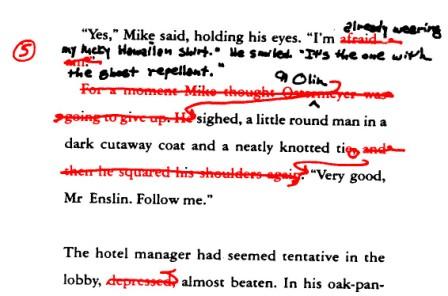
A rewrite example from On Writing
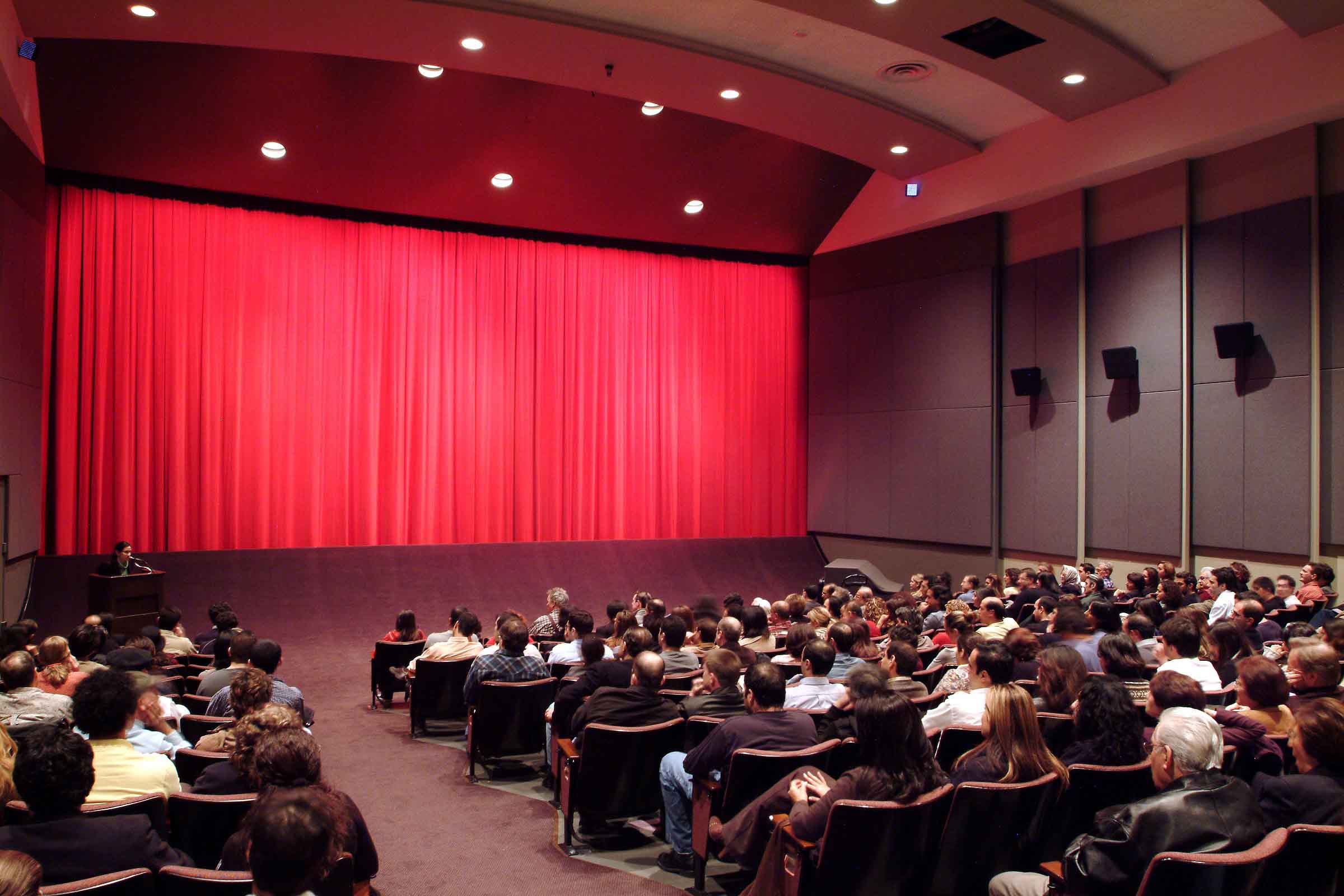
Melnitz Movies James Bridges Theater, UCLA
For two years, while a student at University of California at Los Angeles in the late 1980’s, I managed Publicity and Public Relations for UCLA Melnitz Movies. This is a little known fact amongst my friends and colleagues because it long ago dropped off the bottom of my resume. Perhaps it’s time to add it back on (to LinkedIn, at least, where there’s plenty of room). I was an English major at UCLA, but I took enough cinema classes to qualify for a Film minor, had I bothered to pursue the paperwork. Melnitz Movies was (and still is) affiliated with the UCLA Film & Television Archive, the world’s largest university-based media collection. We utilized the archive to show one or two week retrospectives of a particular actor, director or producer, followed by a preview of their soon to be released film. The goal was to get them to attend the final showing and field some questions from the audience. We were able to use this ploy to get several big names to drop by. The small theater (seating less than 300) and low-stress academic setting helped; as did the Film & Television Archive’s prestige and the school’s proximity to Beverly Hills, Bel Air and Pacific Palisades where these cinematic luminaries lived. Rob Reiner, Richard Lester, Clint Eastwood, and Peter Weir were just a few of the Hollywood folks I met during this period of my career.
Interestingly enough, one of the people that really stands out in my memory is Tab Hunter. He wasn’t the biggest name, but he was unpretentious and approachable and although we were from two different worlds and generations (he is exactly my father’s age) we had some great conversations. As it happens, Tab turns 81 today. Happy Birthday Tab!

Happy Birthday Tab!
Tom (me) on the left, and Tab.
Tab Hunter is a connection to the Golden Age of Hollywood and the old studio system era. Along with James Dean and Natalie Wood, he was the last of the actors placed under exclusive studio contract to Warner Bros. In the 1950’s Tab Hunter was Hollywood’s boy wonder, starring in dozens of major motion pictures with just about all of the leading ladies of the time. He also became one of the first rock music teen idols with a 1957 number one record, Young Love (knocking Elvis Presley out of the top spot for six weeks). With the studio controlling every aspect of Tab’s image (Warner Bros. Records, was created to manage and better profit from his singing career) he led a double life as a teen heartthrob while secretly in a relationship with actor Anthony Perkins (of Psycho fame). Read his 2005 book, Tab Hunter Confidential: The Making of a Movie Star for his version of the decline of the studio system, on being gay in Hollywood in the 50’s and 60’s, and of course many anecdotes about the movie stars of that era. When I met Tab his career was experiencing somewhat of a revival with roles in John Waters’ Polyester and the cult comedy-Western Lust in the Dust. He still acts in the occasional play and sometimes guest DJs on SiriusXM Radio. A documentary based on his autobiography is currently in production and is due for release in 2014.
That’s it. I just wanted to wish Tab a happy birthday with many joyful years to come!
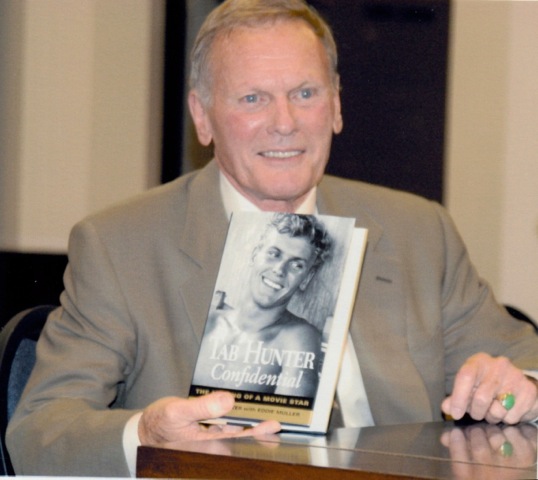
Tab Hunter at a 2005 book signing.
I’ve been getting a real kick out of teaching business and technology courses at a local community college. My motto, “Those that can do, teach!” This summer we’re working our way through the basics of Microsoft Office 2010. In my classes I try to emphasize real-world business and technology examples from my 6 years as an Information Technology Manager for Credit Suisse Bank and my 12 years as a Windows Marketing Communications Manager at Microsoft. Along the way I’m learning as much as I am teaching and my students’ (and my) Aha! moments keep me motivated through our late night sessions. Teaching is a nice way to give back to your community as well as an important reminder of the how theory (the way it’s supposed to work) relates to practice (the way it really works). I hope to continue teaching in the future as a stimulating adjunct to my day job, whether it’s business basics or more specialized classes in Marketing Communications and Social Media.
What follows is something I wrote up for a couple of current students in my class who were unhappy with our book’s explanation of how to change the default settings in Word (sorry Prentice Hall!). I’ve been doing these sorts of crib sheets for my mom since setting her up with her very first PC, about 25 years ago. In my mom’s case she wanted Word to produce documents that looked like they came from a 1960’s era IBM Selectric (think monospaced slab serif, think MadMen) with preset page numbering so she wouldn’t have to remember to add these each time. Maybe you have accepted the advent of proportional type, but are still no fan of 11 point Calibri with 1.15 line spacing? Here are a few options for you:
Editing the Normal.dotm template in Word 2010
Do you find yourself making the same set of changes to every new Word 2010 document you create? For example, do you change the default font from Calibri to Times New Roman, the line spacing from 1.15 to 1.0 and add automatic page numbers to the footer? If so, take a few moments now to save yourself from doing this a thousand times in the future.
One solution is to create your own template. This is pretty easy. Start by opening up a new document and make all the changes you like. Along with font, margin, line spacing, header/footer changes you might even include some starter text such as “Dear Sir or Madam, Will you read my book? It took me years to write, will you take a look?” along with your standard contact information. Then go to the Backstage View by clicking on the File tab in the upper left corner. Choose the “Save As” option and change the “Save as type” selection from Word Document to Word Template. Save your new template to your desktop with an easily identifiable and memorable name.

Save as type: Word Template
The downside with the above solution is that you have to change your behavior a bit and remember to open the template each time you begin working in Word. This may make a lot of sense if you frequently write three types of documents and create a template for each. But, frankly, for most of us this is an inelegant solution. Most of the time we want to just open Word and just start writing with the font, spacing, etc. we prefer. And who needs the added clutter on your Desktop? True, you could save new templates to your Templates folder instead of the Desktop, but you will still have to remember to choose a specific template each time you start because the standard Word defaults (stored in the “mother template” named Normal.dotm) remains the same.
The best practice (and what Microsoft suggests you do if an additional template doesn’t fit the bill) is to make your desired changes in the corresponding Dialog Box and click Check as Default. For example, to set Arial instead of Calibri as your default font click on the Home tab, click the Font dialog box Launcher, and then click the Font tab.

Font Group
Actually, if you are going to make a change from Calibri to something more readable I’d choose a serif font like Palatino Linotype, or Times New Roman and bump it up to 12 points. Arial is even harder on the eyes than Calibri!
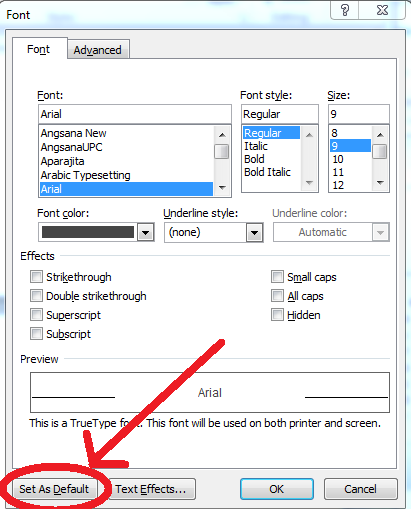
Font tab, Font dialog box – Set as Default option
In the resulting Font Dialog Box (see above) you can select the options that you want to apply to the default font, such as Font, Font style and Size. If you selected some text before you opened this dialog box the properties of the selected text will appear as presets. Make all your changes and click Set As Default, followed by OK.
You can change other default settings the same way you changed the default font. Go to the Paragraph group on the Home tab and choose the Paragraph dialog box launcher as you did for the Font. Set spacing and other options, and click Save As Default. Go to the Page Layout tab and the Page Setup group to change your page-layout settings. Be sure to click Save As Default each time. Now whenever you open a new Word document the default settings will reflect all the changes you made.
—————————————
But wait, there’s more!
That might be the end of the story, but there is another way to change your default Word 2010 settings that will appeal to the geeks and control freaks amongst us (works pretty much the same way for Word 2003 and 2007). All of your default document options are saved in a template called: Normal.dotm. It’s a template like any other template except it is the one that Word always goes to first, by default. You can visit your Normal.dotm anytime by entering the following in the “Search program and files” box at the bottom of the Start Menu and then clicking Enter: %appdata%\Microsoft\Templates. The location of this folder varies depending upon your user name, your Windows version and how your PC has been configured (it is likely in someplace like this: C:\Users\YourUserName\AppData\Roaming\Microsoft\Templates),
but %appdata%\Microsoft\Templates will always get you there. You can also enter this string into the address bar of any Windows Explorer folder or while navigating within an application, such as Word. It works in Internet Explorer as well.
So, there it is, Normal.dotm the keeper of all your default settings in Word. But you can’t just open it up and start making changes because you can’t modify Normal.dotm while Word is running. This is to prevent you (or others with malicious intent) from really screwing up your Word. If you simply delete Normal.dotm, Microsoft’s original version of the file will magically recreate it the next time you launch Word – a kind of failsafe solution against any kind of mischief. However, you can take a backed-up copy of Normal.dotm that you customized earlier and rename it as Normal.dotm, and then Word will use it as your default template. Here’s what you do, open a new Word document and make all the changes you want to appear in all your future Word docs. Save it as a macro-enabled template (Word Macro-Enabled Template) with the name “Normal-New” to your template folder (%appdata%\Microsoft\Templates). Now close Word and go to that folder and rename your Normal.dotm to “Normal-Old” and your “Normal-New” to plain old “Normal”. Now when you restart Word all your changes will be reflected in the new, default document. If you screwed up somewhere along the way, simply delete Normal.dotm (when Word is not running) and Microsoft’s original version of the file will be recreated the next time you launch Word.
It’s not about a conflict of interest. It’s about a concurrence of interests. 
While it may not change the way you go about your business today (unless you are planning on joining a flash mob) Social Media Day is a great reminder that the world of marketing communications and public relations has changed dramatically and irrevocably from the days of yore (say, 10 years ago…)
Just yesterday, however, I was reminded that some people in the marcomm profession still don’t get it. Since leaving Microsoft a couple of years back I’ve been consulting for local startups on their marketing communications strategies. These young and scrappy (i.e., cash strapped) companies inherently understand the new world of social media. Having scratched my itch to experience the start-up culture first hand, I have lately begun looking into returning to the world of big business, where, apparently some of the old world thinking still survives.
I recently applied for a Director of Marketing Communications position at a local Seattle institution. Two weeks later I received this standard reply, “After a careful review of the applications submitted for this position, your application has not been selected for further consideration.” I was intrigued. Motivated by Groucho’s Corollary, any organization that doesn’t want me must be a great place to be; I decided I couldn’t let this rest. Finding the hiring manager on LinkedIn, I sent him an invitation to join my network. What was not surprising was that he declined, only his reason for doing so, “As you can imagine, in my position, I get these sorts of requests on a regular basis. Unfortunately I have made a conscious decision to not accept requests from potential candidates to avoid any perceived biases for future positions.”
Do you see the humor in this? This guy is hiring a marcomm director and has absolutely no clue about social media! LinkedIn is all about common interests, not conflict of interest. If you are afraid of adding anyone to your network that might have professional interests in common with yours (or whose other contacts may have such connections) then you really ought to delete your LinkedIn account altogether. Finding unforeseen connections is the whole purpose of using social media for professional/career purposes.
I’ll admit that my invite may have come out of the blue and that I did have ulterior motives. For one thing, I am tantalizingly close to attaining that mythical 500th connection, after which LinkedIn stops displaying the exact number of people in your network and profile viewers can only wonder at the untold minions under your sway. And, of course, I wanted to open up a dialogue with the hiring manager about that Director of Marketing Communications position. But his stated reason for turning me down was jaw dropping. To avoid any perceived conflict of interest! In my opinion the only good reasons for not adding someone to your LinkedIn network are 1) you don’t know them well (which applied to this situation) or 2) you know them but really don’t like or respect them (even then, I’d argue they might be worth a shot).
There is no time to sit on the sidelines while the marcomm profession grapples with the implications, repercussions and “messiness” of social media. You have to participate – now! It’s not about conflict of interest; it’s about a concurrence of interests. Wake up and smell the coffee, it’s 2012. And oh yes, Happy Social Media Day!
——————–
The follow-up to this story is equally cringe worthy. I wrote a polite note back to the hiring manager including many of the above thoughts. In his reply he said upon reconsideration he would accept my LinkedIn invite, not because we’re in the same profession, but because I had mentioned that we had spent some time working together at another Seattle institution. This rather puts in doubt just how careful his “careful review of the applications submitted for this position” was since that information was rather prominent on my resume. All this should come as little surprise to job-seekers in the current environment; being passed over for an interview opportunity by someone who has not read your resume and has no clue what the advertised position entails is pretty much par for the course. Maybe Groucho was wrong, maybe I don’t want to belong to a club that would not consider me as a member. At least not this one.

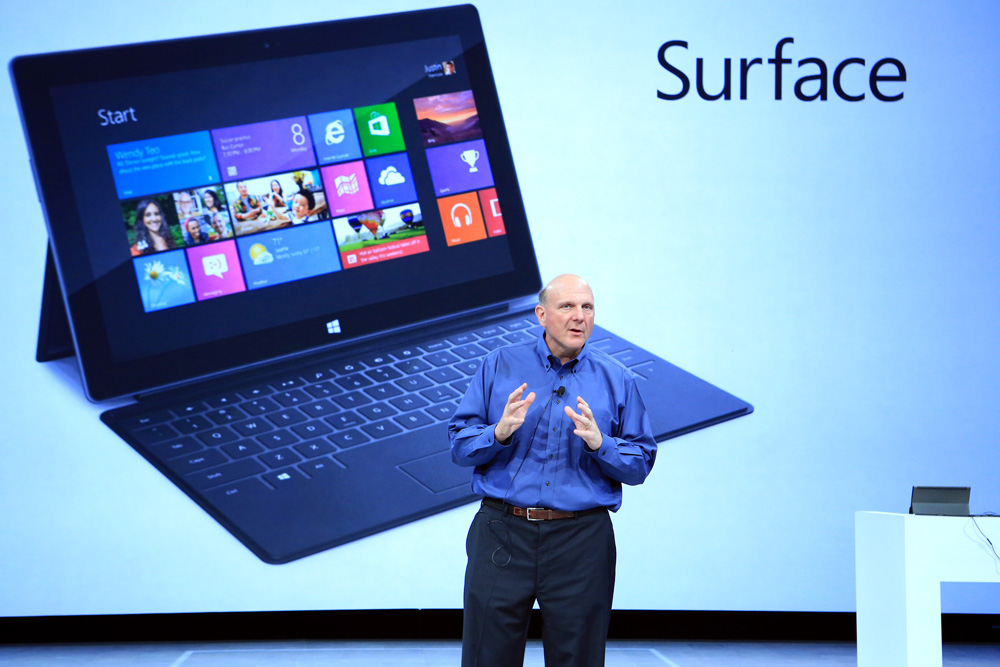
Steve Ballmer, Microsoft Chief Executive Officer, reveals Surface, the new family of tablet/convertible PCs for Windows, at an event in Los Angeles, California.
There are a lot of interesting things about today’s Microsoft Surface Tablet news, not least of which is the way in which it was delivered. There’s a pattern to major Microsoft announcements and this didn’t follow the usual playbook. Journalists were told late last week that there would be major Microsoft news in Los Angeles today and the exact venue was not revealed until hours before the event. This meant that many had to fly in (from the Bay Area and New York) on a wing and a prayer. It takes guts to pull a stunt like this.
For those that missed the news, Microsoft announced that they will be making an ultra-book-sized (thin) Windows 8 tablet – dubbed “Surface” – with a touch screen and integrated keyboard. Think an iPad with the additional functionality of your desktop Windows PC. Think no compromises: both a sexy new toy and a kick-ass productivity machine.
Over the weekend the conjecture and rumors were flying. With hype like this, there was a real potential for an immediate backlash if the news was not significant enough. The technology press is a jaded and easily disgruntled lot. Instead journalists seemed genuinely impressed during the presentation – I especially enjoyed the Princess Bride “I-know-something-you-don’t-know moment” when the integrated keyboard was revealed. The immediate rush of news that I saw after the press event was overwhelmingly positive.
For those that missed the significance of this news, for the first time Microsoft will be making its own PCs. I’ll have more to say about this in the future as there are numerous repercussions, but for now I’m merely marveling at the “reveal.” First, that they were able to more or less keep this news a surprise. This tells me that very few press were pre-briefed. This also explains the Monday afternoon event (normally Mondays are reserved for pre-briefing a Tuesday announcement). The Los Angeles location (which Microsoft called, Hollywood) might be seen as a bit of misdirection because New York would be the expected venue for such consumer news. The minimum of news leaks also tells me that only the top brass at the PC manufacturers were given a heads up, as the OEMs leak like sieves, especially news like this which they certainly viewed with some trepidation. Also clever was the use of the existing “Microsoft Surface” name and trademark. I (alas, but few others) know “Surface” as the large-scale table-top computer technology introduced by Microsoft in 2007. Repurposing the name for today’s announcement provided a bit of ambiguity and air cover in the run-up to the announcement.
The backlash is sure to come as more press have more time to use the devices and think things over. For me, this resolves some of the cognitive dissonance presented by key Windows 8 features. So for now let’s let Microsoft bask in the afterglow of a press event well done. Well played, Microsoft, well played…

Surface’s many Touch Cover options.
Citing Sources
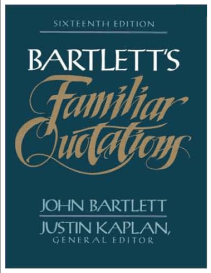 Back in the day, a big fat Bartlett’s occupied a prominent and easily accessible location on my bookshelf. That’s Bartlett’s Familiar Quotations for the uninitiated, arguably the best known and most authoritative English language collection of quotes. My edition weighs in at just over 1,400 pages. It was first published in 1855 by John Bartlett, who ran the University Book Store in Cambridge, Massachusetts (“Not a big college town.” This is Spinal Tap). Bartlett’s was the reigning king of quotations for 150 years, until the Internet ascended the throne in the new millennium (“The King is dead. Long live the King!”). As far as I can ascertain the last hardcopy version of his book was the 17th, published in 2003.
My fellow linguaphiles understand the pleasure that leafing through a book of quotations can convey. But alas, even when combined with its shelf mate, The Oxford Dictionary of Quotations (1,100 pages), Bartlett’s pales in comparison to the efficiency and the efficacy of a simple Internet search. The Internet is not, however, an authoritative resource. When using quotes in your writing, be sure to cross-reference/double-check anything you dig up from the Internet to avoid propagating misinformation. Be especially wary of attribution. People love to ascribe sayings to Mark Twain, Albert Einstein and others when it ain’t necessarily so (Porgy and Bess, lyrics by Ira Gershwin). If in doubt, you are better off not citing an author at all, or attributing the quote to anonymous/unknown. Or you could simply cite it as a “saying” or a “proverb”.
At the risk of duplicating the efforts of untold others, or worse, spreading some misinformation of my own, here is a short list of some of my favorite quotations:
- There are two kinds of people in this world, those who think there are two kinds of people and those who don’t! —Robert Benchley’s Law of Distinction (I’m the second kind)
- In the long run, we’re all dead. — John Maynard Keynes, Economist
- I have nothing to declare except my genius. — Oscar Wilde, quoted in “Oscar Wilde” 1918 by Frank Harris Oscar. Reputed response to a customs inspector upon his entering the US. I wouldn’t advise trying this today as you’re likely to get strip searched.
- “Some cause happiness wherever they go; others whenever they go.” — Oscar Wilde
- Summer afternoon, summer afternoon; to me those have always been the two most beautiful words in the English language —Henry James, American novelist and critic, quoted in Edith Wharton, A Backward Glance, 1934
- The only true measure of success is how much time you have to kill.
- I used to think I was indecisive, but now I’m not so sure…
- “Cast down your bucket where you are!” — Booker T. Washington’s Atlanta Compromise Speech
- “You could not step twice into the same river; for other waters are ever flowing on to you.” — attributed to Heraclitus, On the Universe, Greek philosopher (540 BC – 480 BC). More common is the updated version, “”No man ever steps in the same river twice, for it’s not the same river and he’s not the same man.” It is also thought to be an Native American proverb: “You can never enter the same river twice.”
- Be better than anyone faster & faster than anyone better. (How to succeed in business or just anything, I suppose. A.J. Liebling’s original: “I can write better than anybody who can write faster, and I can write faster than anybody who can write better.”)
- A good hockey player plays where the puck is. A great hockey player plays where the puck is going to be. — Wayne Gretzky (Another saying attributed to the Great Gretzky that I like, “You miss 100% of the shots you don’t take.”)
- Anyone can do any amount of work provided it isn’t the work he is supposed to be doing at the moment. — Robert Benchley
- Any sufficiently advanced technology is indistinguishable from magic. — Arthur C. Clarke
- Life is a sum of all your choices. — Albert Camus

Today is the LGBT (Lesbian Gay Bisexual Transgender) Day of Silence, observed in schools across the US to protest bullying and harassment of gay and lesbian students. Or, on the opposite end of the spectrum, today is the day religious right organizations, such as Mission America, encourage efforts to counter the event by distributing Christian flyers and having children stay home in protest.
Today is also 420 (April 20), a kind of marijuana holiday in the cannabis culture. On this day pot enthusiasts gather to celebrate and consume cannabis. Political protests and demonstrations are held in many American cities to raise awareness for marijuana policy reform.
Today also marks the culmination of a week of global advocacy activities sponsored by Invisible Children in their efforts to spread the word about Joseph Kony, a Central African warlord who has killed and abducted thousands of people over the past 25 years. Participants are urged to wear their official Kony 2012 T- shirts, contact their leaders, serve their local community, and “hit the streets” on April 20 in a show of solidarity.
So, whatchya gonna do? That probably depends on how well the organizations behind these causes were able to create grassroots efforts to encourage your participation. It also depends a lot on your age, as all three of these events are targeting high school and college students.
How many of these three happenings managed to capture your attention? Are you going to participate in any of the events? Or, is it possible you didn’t even realize that today is the day?
Photo Credit: James Cridland
 marcommman